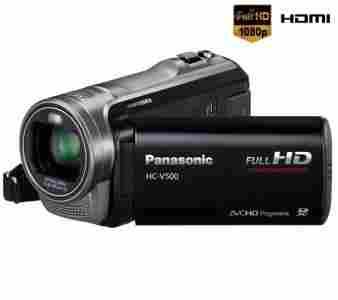
You can shoot macro close-ups while maintaining a distance of 70cm from your subject. In addition, using the zoom at full magnification makes it much easier to capture extreme close-ups without your body or camera casting a shadow on the subject and while keeping the background in soft focus.
The Crystal Engine PRO instantly processes the huge amount of data that goes into Full-HD images, and further enhances Full-HD quality. It produces smooth, high-resolution zoom shots even when the range exceeds the limit for optical zooming. Crystal Engine PRO clearly delineates even the tiniest details of your subject, with extremely natural beauty. In addition, its Noise Reduction (NR) technology has been completely redesigned. The low-frequency noise that occurs when recording in dim lighting has been further minimized. Compared to previous Panasonic models, noise has been reduced by approximately 40%.* And Intelligent Resolution Technology ensures sharp and crisp pictures, resulting in bright and beautifully colored motion images.* Compared with the conventional engine for HDC-SD80, HDC-TM80, and HDC-HS80
Sharpens details and enhances smooth areas.
Intelligent Resolution Technology
The Intelligent Resolution Technology incorporated in the Crystal Engine PRO uses edge detection technology to confirm the edges of objects within the image, then emphasizes the edges for optimal clarity. For example, it brings crisp definition to patterns and the outlines of objects like flowers. Conversely, it reduces noise and enhances the natural smoothness of parts without edges, like the sky. The increased sharpness is especially effective for images with delicate details. This highly advanced technology maximizes the beauty of Full-HD images.* Intelligent Resolution Technology works only for digital zoom shots.
Beautiful images even in dimly lit place.
High Sensitivity Sensor
The High Sensitivity Sensor on the V500/V500M has a higher level of sensitivity than conventional
sensors, to make dark scenes brighter and more beautiful. Ideal for shooting indoors, at parties,
and in similar situations, it greatly increases your shooting opportunities.
Crisp, clear images even for fast-moving subjects
AVCHD Progressive Compliant 1080/60p (50p) Recording
1080/60p (50p) recording (Full-HD, 1,920 x 1,080, 60 (50) progressive recording) conveys about twice the information of 1080i (interlace) recording. Fast-moving subjects, such as in sports scenes, are smoothly recorded. The progressive recording of the V500/V500M fully complies with the AVCHD Progressive standard.
- Interlaced Scanning (1080/60i (50i))
- Only half of the image data is reproduced in each picture. Fabric patterns run together, and moiré patterns appear.
- Progressive Scanning (1080/60p (50p))
- Reproduces all of image data in a single picture. Patterns in fabric are crisp and clear with no color bleeding.
Enjoy 3D images the easy way.
2D to 3D Conversion
2D images can be easily transformed into 3D images with the 2D to 3D Conversion function. Simply connect the camcorder to a 3D-compatible TV with an HDMI cable. The 2D to 3D Conversion function then uses the image processing capability of the engine to convert 2D images into 3D. This is an easy, casual way to enjoy the excitement of 3D.
Play a compilation of the most exciting scenes.
Advanced Highlight Playback
Select the days of the recordings you want to see, and this innovative function automatically selects the most exciting scenes, arranges them, plays them, with music, or ones that the user has personally selected, according to a set time interval. It decides how exciting a scene is, based on zooming, panning, and scene changes, and whether there are faces. The V500/V500M has both advanced with the addition of playback effects that include slow motion, still image fading, and flash playback. Four image effect modes – natural, pop, dynamic and classical – have also been added. Set different effects based on the mood of your images, and enjoy memorable scenes just the way you remember them when shooting. The Face Highlight Playback mode places priority on selecting the faces of subjects who are registered in the Face Recognition function, for quick playback of the scenes where they are clearly recorded, together with music.
Playback image effect mode
Enjoy more impressive highlight playback with natural switching effects.
View highlight playback of the images you've taken, together with a variety of fun effects.
Enjoy highlight playback with speedy, dynamic effects.
Enjoy highlight playback with dramatic effects applied mainly to your subject's faces.
Variety of index for easy selection of particular scenes.
Face Highlight, Highlight and Time Frame Index
The index function has been enhanced with the addition of a feature that divides each recorded
scene into a number of smaller scenes, and displays thumbnails for each. This makes it much
easier to find a particular part of a scene without having to fast-forward.
- Face Highlight Index
- The Face Highlight Index selects scenes that have faces in them and displays them in an index format. This handy function lets you quickly find and view scenes that have people in them.
- Highlight Index
- The camera automatically selects and displays the most exciting scenes. It determines the level of importance of each scene based on zooming and panning, and whether there are faces. This gives you an easy, convenient way to view all the highlights together.
- Time Frame Index
- This mode divides each recorded clip into 3-second, 6-second, 12-second, 1-minute and 5-minute intervals, and displays them. This is convenient when you want to find a specific scene within a long clip.
Easily watching with connect a cable - or just use the memory card.
Easy Connecting, Easy Viewing
Just connect your HD camcorder to an HDTV and get ready for an incredible high-definition
video show. If your TV is HDMI* compatible, a single HDMI mini cable is all you need. When
using a video component cable, you need a separate audio cable.* HDMI, the HDMI logo and High-Definition Multimedia Interface are trademarks or registered trademarks of
HDMI Licensing LLC.
- VIERA Link
- Connect your HD camcorder to a VIERA* or compatible Blu-ray Disc™ Player* via an HDMI mini cable, and you can control both units in synchronized operation with a single remote control. This kind of simple, easy operation makes it enjoyable to view your recordings.
* Availability of models may differ depending on the country.
* With VIERA Link, a control signal sent through the HDMI cable allows linked operation of a VIERA TV, compatible DIGA DVD recorder, and the HD camcorder. Please note that this function applies only to equipment that is compatible with VIERA Link, and that VIERA Link does not let you control every function of all connected equipment.
- Playback with SD Card
- Just slip the SD card from your camcorder into the SD card slot on your VIERA TV* or Blu-ray Disc™ Player,* and you're ready to view Full-HD moving images recorded.
* Availability of models may differ depending on the country.
The models availability varies depending on countries and regions. JPEG format still images can be viewed with other SD Memory Card Slot-equipped models.
Copy in Full-HD 1080/60p (50p), Full-HD 1080/60i (50i), or MPEG-2 Format
Archiving and Playback
The HD camcorders have a USB Host function that lets you connect directly to a DVD burner
via a USB cable. Then just press a button and you can copy the moving images you recorded
from the SD card or Built-in Memory to a DVD disc.*
** AVCHD compatible models.
- Easy AVCHD to MPEG-2 Conversion
-
You can make a copy either in the original high-definition AVCHD format,* or in the standard-definition DVD-Video (MPEG-2) format. Choose the one that matches your playback equipment.* Except for 1080/60p (50p) recording format.
- Archiving 1080/60p (50p) Data with a PC or Blu-ray Disc™ Recorder***
-
You can save 1080/60p (50p) video data onto a Blu-ray Disc™ by using a PC or Blu-ray Disc™ Recorder.*** *** Available only for Spring 2012 or newer models.
Playback with a DVD burner
To view the disc you just burned, simply connect the HD camcorder to an HDTV via an HDMI mini cable.• The 12-cm DVD discs that you create with a DVD burner can be played on a Blu-ray Disc™ Player.
Use your PC and included software HD Writer AE 4.0
Editing, Archiving and YouTube™ or Facebook™ Uploading
HD Writer AE 4.0 software, included with the camcorder, makes it easy to play or edit videos on your PC and have more fun when the shooting's done. Also, the ordinarily time-consuming task of converting and archiving data from 60p* to AVCHD or MPEG-2 format can be easily done at high speed by connecting the camcorder to a PC with a USB cable and using the camcorder's Conversion Assist function.* 50p for PAL area.
Also Enjoyable When the Shooting's Done
For further information
about Panasonic PC
- Importing Data
- When the camcorder is connected to a PC, the software automatically starts up. Importing data takes only a few clicks of the mouse.
- Easy YouTube™ and Facebook™ Uploading
- The videos you've recorded are easily uploaded to YouTube™ or Facebook™ in their original high quality. HD Writer AE 4.0 lets you share your videos worldwide.
- Editing
- Along with the full editing functions such as adding titles, rearrangement scenes, transition effects, and editing images, a Timeline mode has also been added. This allows a timeline to be displayed with a storyboard, for highly accurate editing while fine-tuning the timing of video images. The playback timing of background music can also be finely adjusted to enable precise insertion.
- Short Movie Story
- The newly added Short Movie Story function makes it possible to transform still images and videos into dramatic short videos. Once the still images/videos, a theme, and background music are selected, the software takes over to automatically produce the movie. When completed, you can save the video onto a disc in HD image quality, or easily upload it to YouTube™ or Facebook™.
- Video Retouch
- Video Retouch is a new function that lets you decorate images with text, graphic painting or stamp pens. By using a game-like approach to add an extra editing touch to finished images, they become even more attractive and enjoyable.
- Archiving
- Make a copy either in the original high-definition AVCHD format, or in the standard-definition DVD-Video (MPEG-2) format.