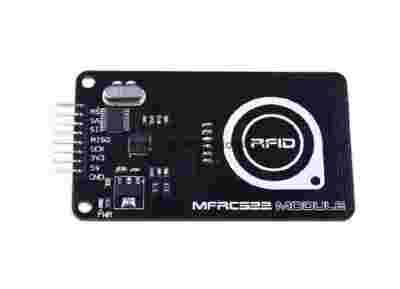
MFRC522 RFID Module
Description:
It is an contactless reader module based on the MFRC522 from NXP B.V.. Communication Via Serial makes it simple and easy-using. Compatible with ISO/IEC 14443 A/MIFARE cards, it supports all variants of the MIFARE Mini, MIFARE 1K, MIFARE 4K, MIFARE Ultralight, MIFARE DESFire EV1 and MIFARE Plus RF identification protocols, and the operating distance in Read/Write mode is up to 40 mm.
This module could be used in a variety of applications: Access management, Tracking of goods, Tracking of persons and animals, Toll collection and contactless payment, Machine readable travel documents, Smartdust (for massively distributed sensor networks), Tracking sports memorabilia to verify authenticity, Airport baggage tracking logistics and etc.
Note:
MFRC522 IC working voltage of 3.3V, the power to the module, do not mistake the input voltage!
Features:
Read more: http://www.elecfreaks.com/store/mfrc522-rfid-module-p-721.html#ixzz388bQZktN
Package List:
Please visit our wiki page for more info about this product. It will be appreciated if you can help us improve the documents, add more demo code or tutorials.
Read more: http://www.elecfreaks.com/store/mfrc522-rfid-module-p-721.html#ixzz388bW3f00
1.MFRC522 Module
2.Jumper Wire
3.Arduino mainboard
4.USB Cable
5.S50 Induction IC Card
6.Clear Card
1.Arduino_RFID_522_CODE
2.Arduino IDE(1.0.5)
1. Download the file of ”Arduino_RFID_522_CODE” from our official website
2. Open ”Arduino_RFID_522_CODE”, and enter into Arduino IDE(1.0.5), the screen like below would occur, then compile and upload the code.
Note: The content in the red circle would remind you that when using Arduino UNO or MEGA 2560 mainboard to test, you need to modify the chipSelectPin into the corresponding pin.
Step 1. Wiring diagram
Compile and run the program in Arduino(1.0.5)IDE. After upload succeed, open the serial port, then place the S50IC induction card or clear card within the induction area of the module, you would see the display effect as follows.
Running effect as below:
Includes important code snippet. Demo code like : Paintcode
void setup() { Serial.begin(9600); // RFID reader SOUT pin connected to Serial RX pin at 960bps // start the SPI library: SPI.begin(); pinMode(chipSelectPin,OUTPUT); // Set digital pin 10 as OUTPUT to connect it to the RFID /ENABLE pin digitalWrite(chipSelectPin, LOW); // Activate the RFID reader pinMode(NRSTPD,OUTPUT); // Set digital pin 10 , Not Reset and Power-down digitalWrite(NRSTPD, HIGH); MFRC522_Init(); Serial.println("Please put the IC card in the antenna inductive zone! ");} void loop(){ uchar i,tmp; uchar status; uchar str[MAX_LEN]; uchar RC_size; uchar blockAddr; //选择操作的块地址0~63 //寻卡,返回卡类型 status = MFRC522_Request(PICC_REQIDL, str); if (status == MI_OK) { } //防冲撞,返回卡的序列号 4字节 status = MFRC522_Anticoll(str); memcpy(serNum, str, 5); if (status == MI_OK) { Serial.println("The card's number is : "); Serial.print(serNum[0],BIN); Serial.print(serNum[1],BIN); Serial.print(serNum[2],BIN); Serial.print(serNum[3],BIN); Serial.print(serNum[4],BIN); Serial.println(" "); } //选卡,返回卡容量 RC_size = MFRC522_SelectTag(serNum); if (RC_size != 0) {} //写数据卡 blockAddr = 7; //数据块7 status = MFRC522_Auth(PICC_AUTHENT1A, blockAddr, sectorKeyA[blockAddr/4], serNum); //认证 if (status == MI_OK) { //写数据 status = MFRC522_Write(blockAddr, sectorNewKeyA[blockAddr/4]); Serial.print("set the new card password, and can modify the data of the Sector: "); Serial.print(blockAddr/4,DEC); //写数据 blockAddr = blockAddr - 3 ; status = MFRC522_Write(blockAddr, writeDate); if(status == MI_OK) { Serial.println("OK!"); } } //读卡 blockAddr = 7; //数据块7 status = MFRC522_Auth(PICC_AUTHENT1A, blockAddr, sectorNewKeyA[blockAddr/4], serNum); //认证 if (status == MI_OK) { //读数据 blockAddr = blockAddr - 3 ; status = MFRC522_Read(blockAddr, str); if (status == MI_OK) { Serial.println("Read from the card ,the data is : "); for (i=0; i<16; i++) { Serial.print(str[i]); } Serial.println(" "); } } MFRC522_Halt(); //命令卡片进入休眠状态 }
Kupując na moich aukcjach za przesyłkę płacisz tylko raz.
Do każdego zamówienia dołączam paragon lub fakturę VAT.
Wszystkie zamówione przedmioty wysyłane są z Polski.
Informacja dla obserwujących aukcję - zdarza mi się kończyć aukcję przed czasem, więc proszę nie czekać do ostatniej chwili.
Kontakt: tel. 663[zasłonięte]362 od godziny: 10-18.